Variables
Most APIs let you filter data by date, but they only accept a fixed date like 2026-07-01, not a phrase like "the last 7 days." That's fine for a one-time import. The trouble starts when you schedule the request to run automatically.
A hardcoded date never moves. Set a filter to created_after=2026-07-12 today, and every scheduled run (next week, next month, next year) keeps asking for data since that same July date. You re-import the same old records while missing everything new, unless you open the request and edit the date by hand before every run. That defeats the whole point of automating it.
Variables fix this. Instead of a fixed date, you write a relative one like {{today - 7 days}}, and Note API Connector fills in the real date every time the request runs, so the window moves forward on its own.
❌ Hardcoded date (breaks on a schedule):
https://api.example.com/orders?created_after=2026-07-12
Frozen at July 12 forever. A week later it still says July 12, so you re-import old orders and never see the newest ones.
✅ Relative date (always current):
https://api.example.com/orders?created_after={{today - 7 days}}
Resolves to a real date on every run: 2026-07-19 today, 2026-07-26 next week. It always means "the last 7 days."
When to use variables
📅 Rolling date windows: always fetch "the last 7 days" or "this month" without touching the request.
🔄 Scheduled syncs: keep automated imports pointed at the right date range on every run.
📊 Reports: pull "last month" sales, time entries, or analytics that update on their own.
🕒 Timestamps: send the current time to APIs that expect Unix or ISO timestamps.
Inserting a variable
You can add a variable to any request field that accepts text (see where you can use variables).
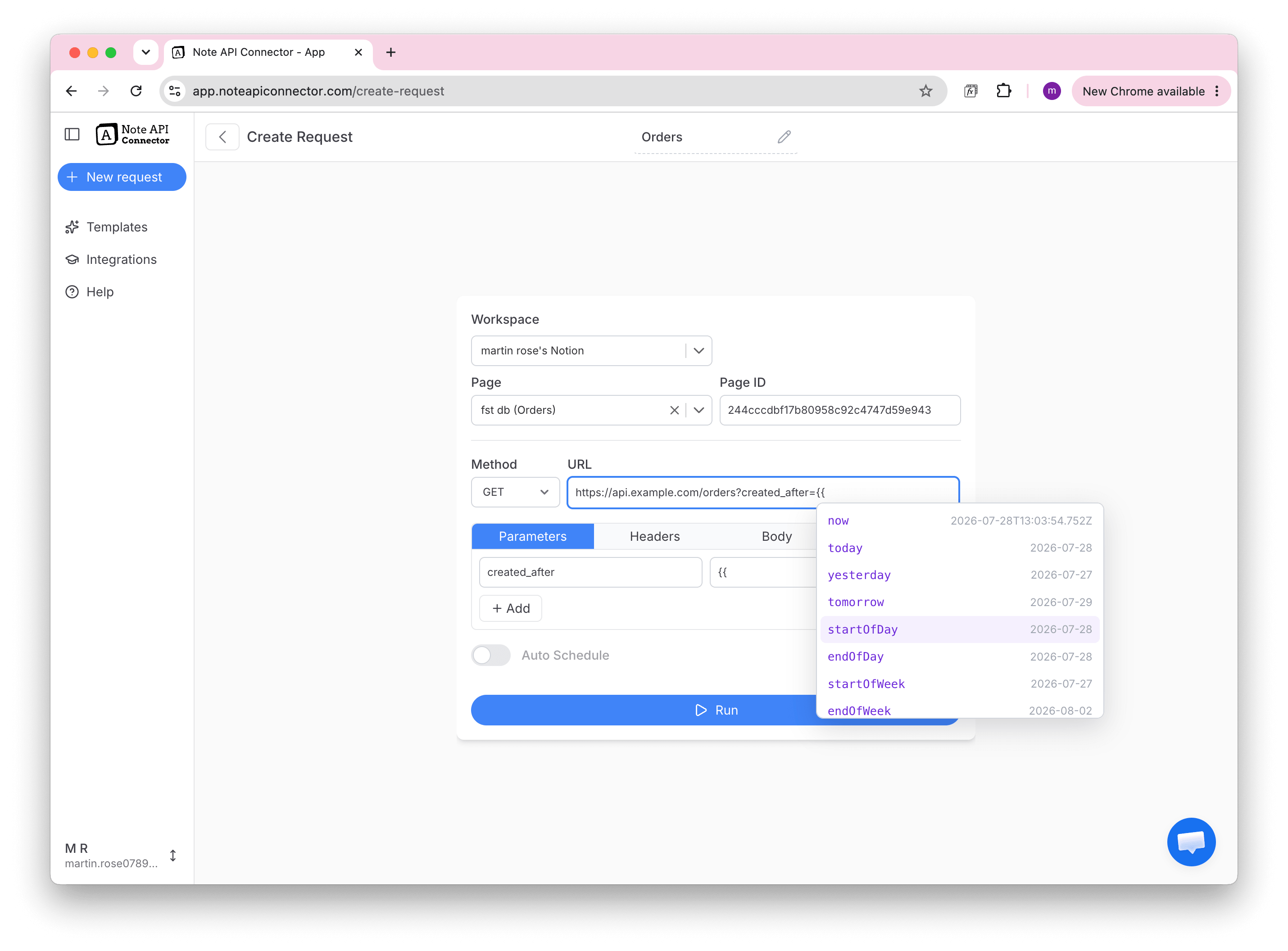
1️⃣ Start typing two curly braces {{ in a field.
2️⃣ A suggestion list appears. Pick a variable such as today or startOfMonth.
3️⃣ Each suggestion shows a live preview of the value it will produce.
4️⃣ Press Enter to insert it, or Tab to also choose a format.
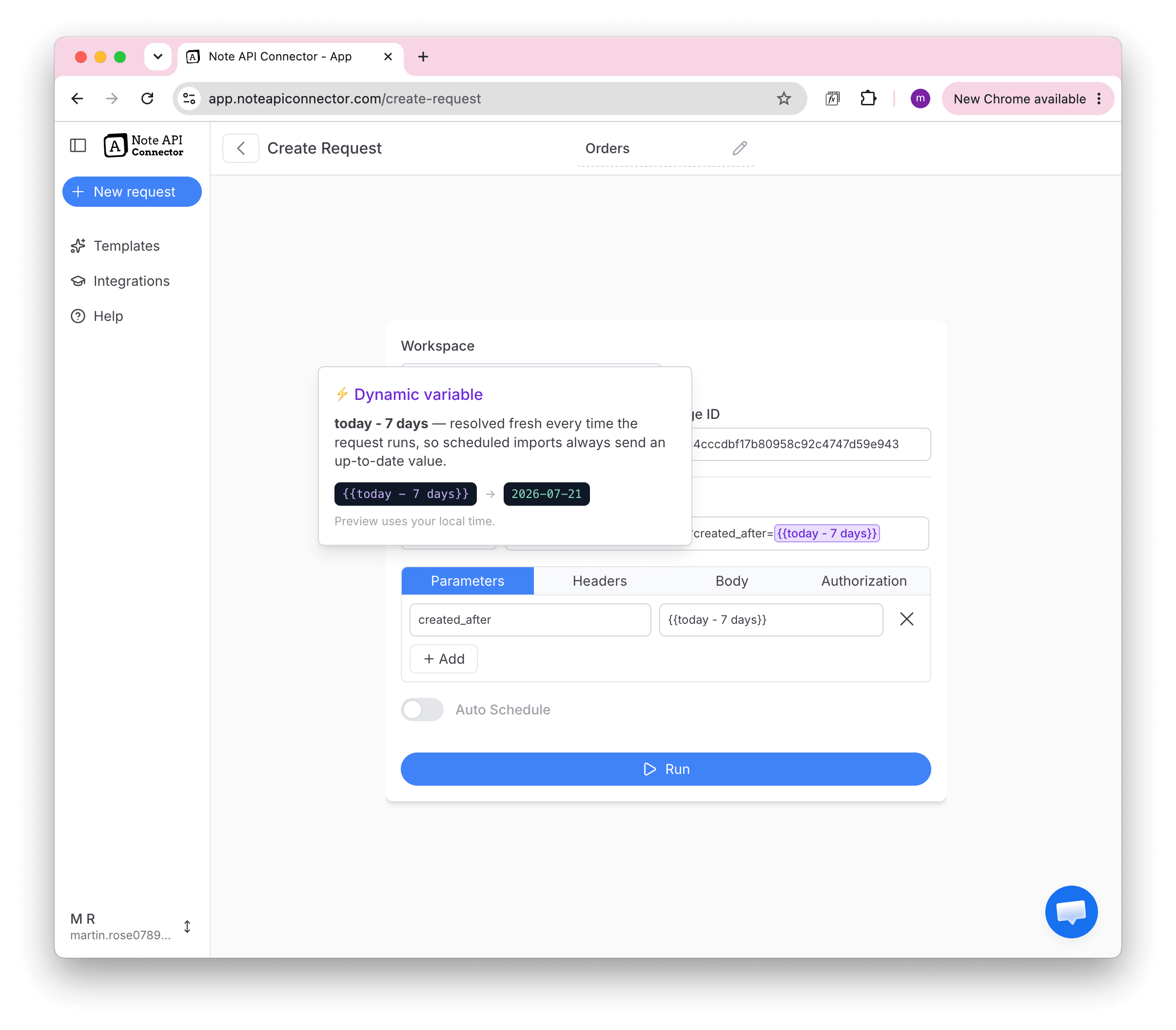
Once inserted, the variable appears as a colored chip. Hover over it to see exactly what it resolves to right now.
You don't have to memorize anything. Type {{ and let the suggestions guide you. The preview next to each option shows the real value before you commit.
Building a variable
A variable has three parts: a base, an optional offset, and an optional format.
{{ base ± offset | format }}
For example, {{today - 7 days | YYYY-MM-DD}} means "today, minus 7 days, formatted as year-month-day."
1. Pick a base
The base is the starting point. Variable names are not case-sensitive.
| Variable | Resolves to | Example |
|---|---|---|
{{now}} | Current date and time | 2026-07-19T14:30:00.000Z |
{{today}} | Today's date | 2026-07-19 |
{{yesterday}} | Yesterday's date | 2026-07-18 |
{{tomorrow}} | Tomorrow's date | 2026-07-20 |
{{startOfWeek}} | Monday of this week | 2026-07-13 |
{{endOfWeek}} | Sunday of this week | 2026-07-19 |
{{startOfMonth}} | First day of this month | 2026-07-01 |
{{endOfMonth}} | Last day of this month | 2026-07-31 |
{{startOfYear}} | First day of this year | 2026-01-01 |
{{endOfYear}} | Last day of this year | 2026-12-31 |
{{startOfDay}} | Today at 00:00 | 2026-07-19 |
{{endOfDay}} | Today at 23:59 | 2026-07-19 |
2. Shift it with an offset
Add or subtract time from the base using + or -, a number, and a unit:
✅ {{today - 7 days}}: a week ago
✅ {{startOfMonth - 1 month}}: the first day of last month
✅ {{now - 1 hour}}: one hour ago
✅ {{today + 2 weeks}}: two weeks from today
Supported units: minutes, hours, days, weeks, months, years (singular or plural).
The unit m on its own is ambiguous. Use min for minutes and mo for months. For example, {{now - 15 min}} or {{today - 1 mo}}.
3. Choose a format (optional)
Add a pipe | followed by a format when the API expects a specific shape. If you skip this, dates use YYYY-MM-DD and {{now}} uses full ISO.
When you type |, the suggestion list offers ready-made formats, each previewing your value:
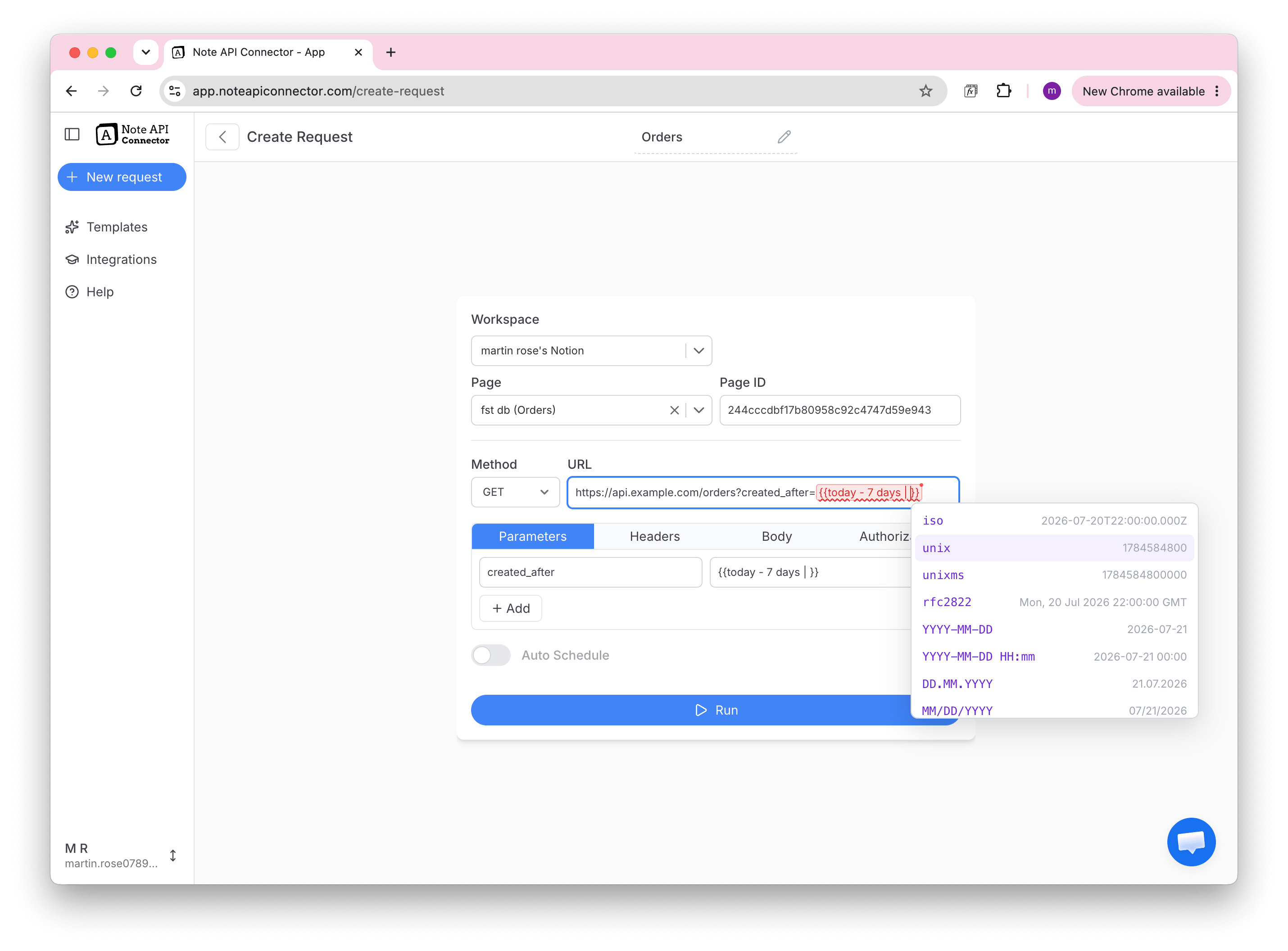
| Format | Example output | Use it when the API wants… |
|---|---|---|
| (default) | 2026-07-19 | A plain calendar date |
iso | 2026-07-19T00:00:00.000Z | A full ISO 8601 timestamp |
unix | 1784851200 | Unix time in seconds (e.g. Stripe) |
unixms | 1784851200000 | Unix time in milliseconds |
rfc2822 | Sat, 19 Jul 2026 00:00:00 GMT | An email/HTTP-style date |
| custom | 19.07.2026 | Your own pattern (see below) |
Custom patterns are built from these pieces:
| Token | Means | Example |
|---|---|---|
YYYY / YY | Year | 2026 / 26 |
MM / M | Month | 07 / 7 |
DD / D | Day | 19 / 19 |
HH / H | Hour (24h) | 14 |
mm | Minute | 30 |
ss | Second | 05 |
[text] | Literal text | [T] → T |
So {{today | DD.MM.YYYY}} produces 19.07.2026, and {{today | YYYY-MM-DD[T]HH:mm:ss[Z]}} produces 2026-07-19T00:00:00Z.
Not sure which format your API needs? Look at a sample value in the API's documentation and pick the format whose preview looks the same.
Where you can use variables
Variables work anywhere you enter request text:
✅ The request URL and query parameters
✅ Request headers
✅ The request body (JSON or form fields)
For example, in a URL:
https://api.example.com/orders?created_after={{today - 30 days}}&created_before={{today}}
Or inside a JSON body:
{
  "dateRangeStart": "{{startOfMonth | iso}}",
  "dateRangeEnd": "{{today | iso}}"
}
Time zones
Dates resolve in your request's time zone. This matters for values like {{today}} the day rolls over at midnight in that zone, not in UTC.
🕒 The preview in the editor uses your computer's local time.
📅 Scheduled runs use the time zone set on the request (from the scheduling options).
For timestamps, {{now}} and the iso / unix formats always represent an exact moment in time, shown in UTC (the Z at the end). The variable tooltip also shows the same moment in your local time, for example "that's 16:30 in America/New_York", so you can reconcile it with your own clock.
Recipes
Last 7 days. A daily-updating date window:
?start_date={{today - 7 days}}&end_date={{today}}
Stripe charges from the last 30 days (Unix seconds):
https://api.stripe.com/v1/charges?created[gte]={{today - 30 days | unix}}
Last calendar month, for a monthly report:
?from={{startOfMonth - 1 month}}&to={{startOfMonth - 1 day}}
Full timestamps in a POST body (e.g. Clockify, Jira):
{
  "dateRangeStart": "{{startOfMonth | iso}}",
  "dateRangeEnd": "{{today | iso}}"
}
Common questions
My variable has a red underline.
The text isn't a valid variable, usually a typo (like {{tody}}). Hover over it to see a hint, or delete it and re-insert from the suggestion list.
My dates aren't updating on scheduled runs.
Make sure you used a variable (it shows as a colored chip), not a date you typed by hand. A hardcoded date like 2026-07-19 never changes; {{today}} does.
The date is off by one day. This is almost always a time-zone difference. Set the correct time zone in the scheduling options, and check the tooltip to see which zone the preview used.